
This article was originally published on Medium.
Table of contents
Open Table of contents
In Short
In the rapidly evolving world of software development, maintaining security, compliance, and efficiency is paramount. Traditional methods of policy enforcement and authorization often fall short in meeting these demands, making authorization a critical aspect.
Following my previous article, Keycloak integration with OpenFGA for FGA, I aimed to continue improving the authorization architecture and provide an agnostic approach for exposing and protecting APIs. In this case, I want to solve this problem by following these premises and best practices:
- Policy as Code (PaC): Policy as Code involves defining and managing security and compliance policies through code.
- Decoupling Authorization: Separating policy code from business logic allows each application component to enforce policies independently. Problems arise when authorization logic is deeply embedded in core application code.
- Low-Code Authorization: It offers a simplified, visual approach to implementing authorization logic, with an intuitive interface for defining access control rules that require little to no coding.
With these points in mind, this article will describe a new authorization architecture that simplifies access control to publish and protect your services with just a few clicks.
I added an identity-aware API gateway, Apache APISIX, as an API sidecar to the authorization architecture to enforce authorization and decouple it from the backend. The gateway will use a plugin that supports Relationship-Based Access Control (ReBAC) policies. Following this approach, you can simply plug and play it in front of your APIs for fine-grained authorization based on the OpenFGA platform. Using ReBAC as the authorization model allows for more granular policies. Decoupling the policies as code in the gateway offers a low-code authorization approach by validating authorization policies to determine if the user is related to the permission/object in your model. As usual in my articles, I start by describing an overall idea, and then you will be able to try it yourself in a hands-on implementation. My belief is that theory and standards are essential, but hands-on practice is where you connect all the dots.
TL;DR
Here, we described the typical authorization components in an authorization architecture. As outlined in the AuthZEN Working Group, these are commonly called “P*P” architectures (PIP, PDP, PEP, etc.).
- Authentication Server: Responsible for handling the authentication, Keycloak supports identity standards such as OpenID Connect and OAuth 2.0. Reinventing the wheel here is unnecessary. As an Identity Architect, I can’t implement this differently.
- Policy Decision Point (PDP): A component that makes authorization decisions based on policies and context information. In this case, OpenFGA is based on the ReBAC Model.
- Policy Enforcement Point (PEP): Responsible for enforcing access control. In this example, the API gateway, based on the authorization policy, communicates with the PDP (OpenFGA platform). In a microservice architecture, Apache APISIX can use a sidecar design pattern to provide additional functionality to application components for protecting the endpoints.
Other Concepts:
- Decoupling the policy logic from the enforcement point in a microservice architecture is even more essential. This separation of concerns is critical in reducing the complexity of the authorization process, enabling communication with PDPs and better lifecycle management of policies. It also keeps the application code focused on functional logic instead of mixing in permissions where they are irrelevant.
- Following Policy as Code (PaC) involves uniform writing, maintaining, and implementing these policies across the development lifecycle using code. This method provides automation, centralized policy management, version control, and an agnostic approach.
Architecture Overview
Based on my previous article Keycloak integration with OpenFGA for FGA, I have improved the architecture by adding an application gateway, as highlighted in the diagram below:
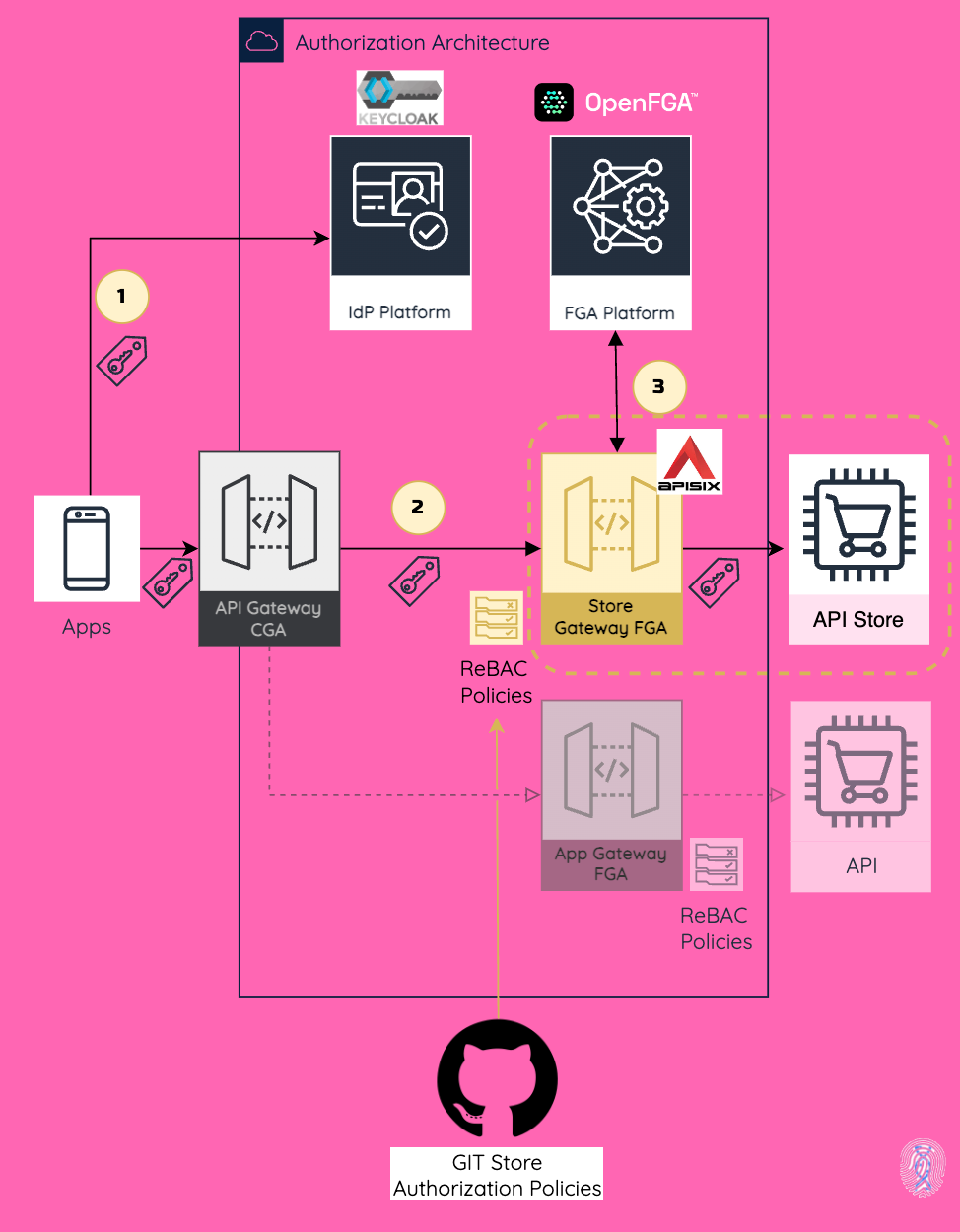
Just to give a high-level review, I have previously synchronized the Keycloak authorization model based on roles with the OpenFGA platform to delegate fine-grained authorization to that platform while the model is still managed in Keycloak.
In this new edition, instead of implementing access control at the API level, I delegated it to Apache APISIX acting as an application authorization gateway. It uses a plugin we developed called authz-openfga, which is responsible for enforcing authorization policies through a simple check to see if the subject is related to a specific object using the OpenFGA authorization check endpoint.
In line with the authorization architecture describe above, we will continue using the identities and roles described in the workshop to illustrate the use case.
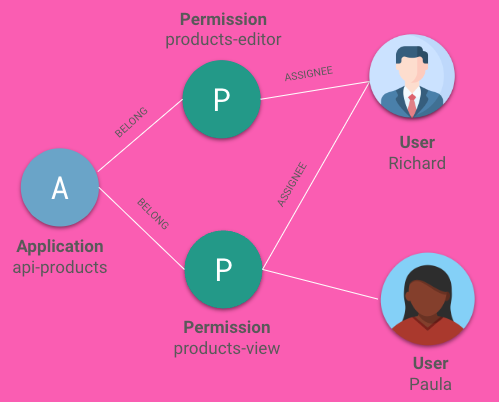
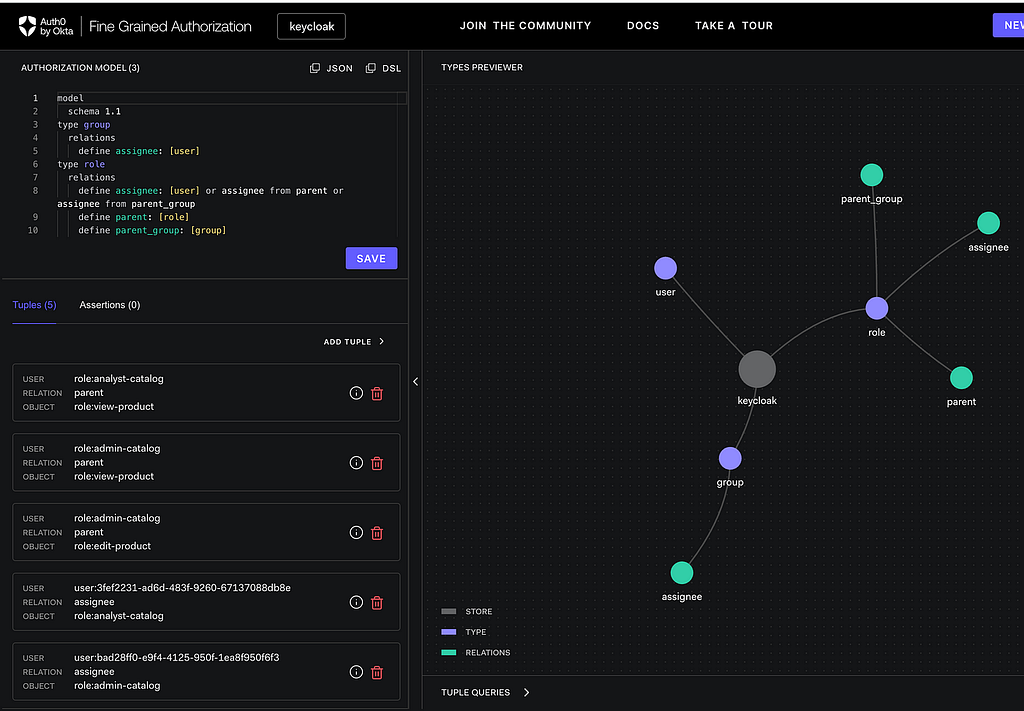
The authorization model is synchronized in real-time from Keycloak to the OpenFGA ReBAC model for the sake of the demo. Here is how you can see it in the OpenFGA Playground console.
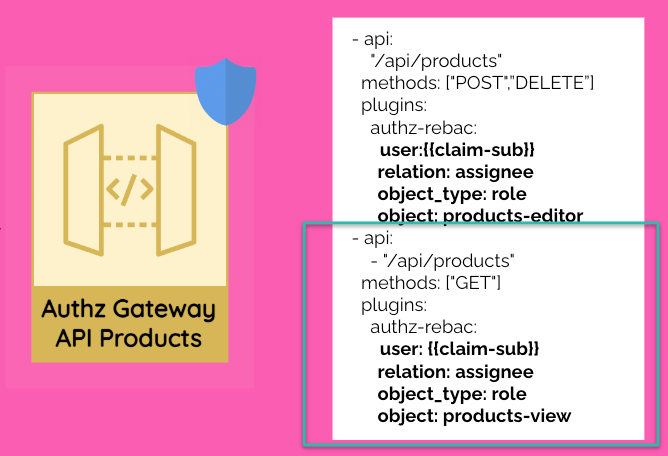
In this example with a simple YAML file in the API Gateway, you can declare the API definition and define the required authorization rules for accessing the API products.
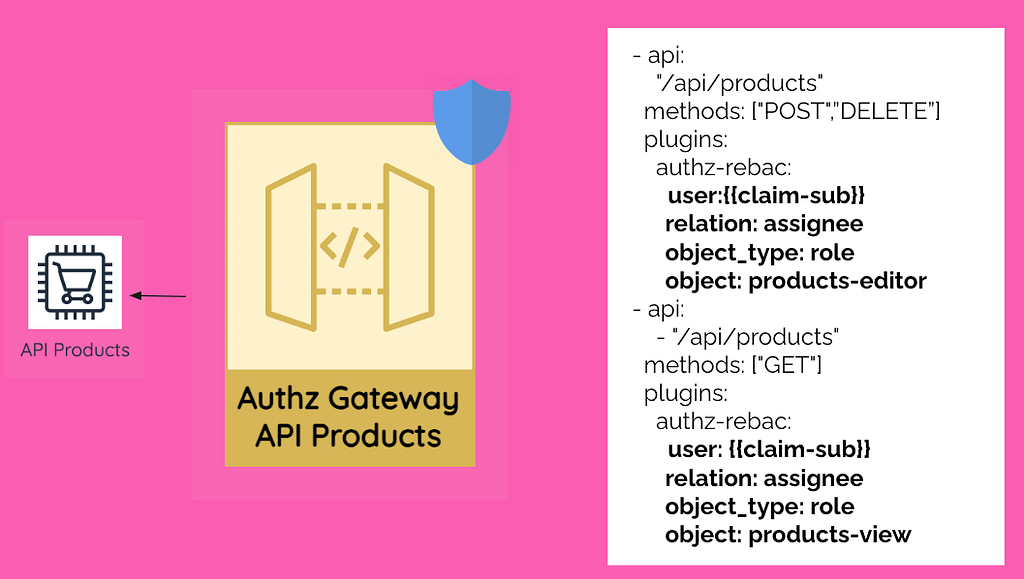
As you can see, the structure is quite easy to follow. For each endpoint, you will define the required relationship with the object. Since this example is based on roles, here I am showing that modifying products requires the role products-editor, while viewing them requires the role products-view.
Let’s go over this example when Paula wants to view the product catalog:
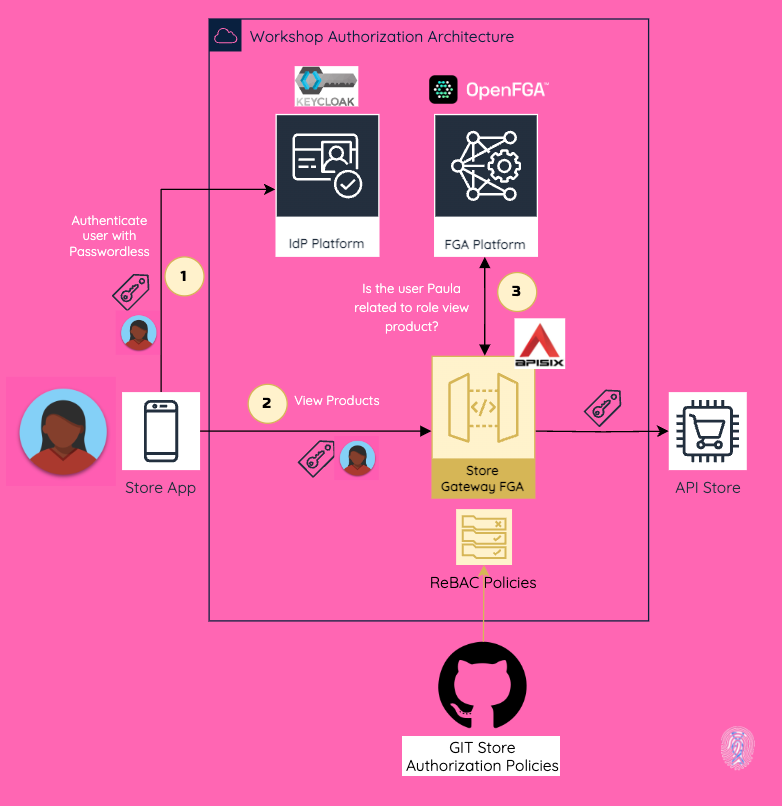
Step 1) Authentication with Keycloak using OpenID Connect
Firstly, Paula accesses the store app and authenticates via Keycloak using OpenID Connect. As a result, the app receives an ID token and an access token.

With the ID token, the app builds the session based on the identity claims.
Step 2) View product information with OAuth 2.0
Then, Paula wants to view the product catalog. In this case, we are using OAuth 2.0, which means the app requests the API by sending the access token in Bearer format, exposed by the API Gateway. This is how we transport the identity information downstream.
Step 3) Access Control at API Gateway Level (Cool stuff happens here)
Once the request matches the API path and method declared in the API definition, in this case, GET /api/products, the OpenFGA authorization plugin performs the following actions:
a. Identifies the user based on the access token received using the standard sub claim, which means that the API is using OAuth 2.0 as one of the authorization protocols.
b. Checks if the user has the defined relationship with the object invoking the authorization check endpoint that comes with the OpenFGA platform.
In this case the user identified by claim sub Paula MUST have a relationship as an assignee with the role product-view. This is how easy it is to define a ReBAC policy, and it is super easy to understand.
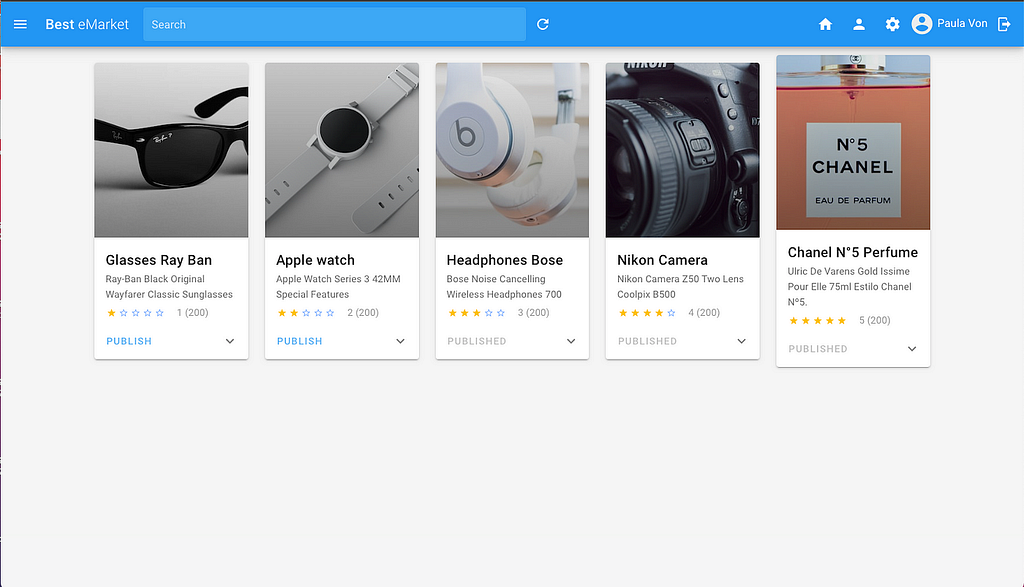
If the user is allowed, the API Products returns the catalog information, and the store displays it.
The plugin Apache APISIX Authorization OpenFGA community edition is available in the following GitHub repo. You can visit there to get more technical information. The enterprise edition, which includes additional features and supports multiple authorization models, is maintained by TwoGenIdentity.
Hands-On
The demo is available in GitHub repo which deploy all the components and the API protected by the authorization sidecar.
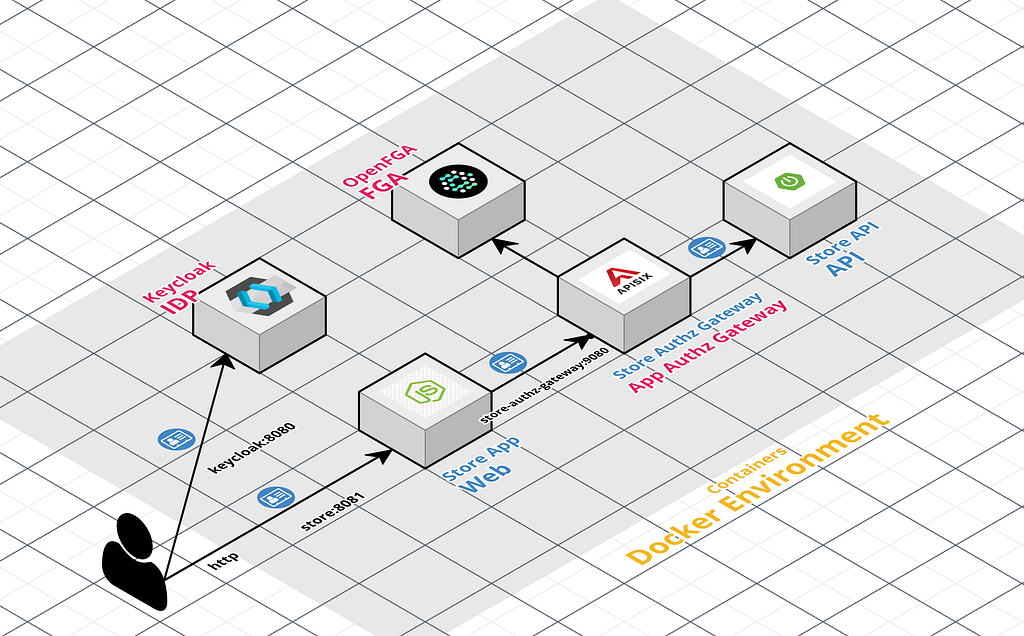
This repo describes how to deploy the following components (some of them were describe before) running as containers:
- Keycloak is responsible for handling the authentication with the standard OpenID Connect and is managing the user access with his Role Model.
- Keycloak is configure with a custom extension keycloak-openfga-event-publisher which listens to the Keycloak events, parses this event into an OpenFGA tuple key and publishes the event to OpenFGA.
- OpenFGA platform is configured with the Keycloak Authorization Model in the store called “keycloak”.
Apps:
- Product catalog web application is integrated with Keycloak with OpenID Connect to authenticate the users
- Store **Authorization Gateway based on Apache APISIX **exposes and protects the Store API with ReBAC policies using the plugin **authz-openfga, **which is integrated with the OpenFGA Platform (Protection at API Gateway).
All the use case details are described in the other article and the workshop. Therefore, I’ll just review some of the configuration of the authorization gateway.
All the components are automatically configured. Thus, the authorization gateway uses the image ghcr.io/embesozzi/apisix-authz-openfga:latest and the routes.yml file includes ReBAC policies for the authz-openfga plugin to handle various use cases.
routes:
  - uris:
      - "/api/products/**"
    methods: ["POST", "PUT", "DELETE"]
    upstream_id: 'store-api'
    plugins:
      authz-openfga:
        host: ${{FGA_HOST}}
        user_jwt_claim: sub
        relation: assignee
        object_type: role
        object: edit-product
  - uris:
      - "/api/products"
    methods: ["GET"]
    upstream_id: 'store-api'
    plugins:
      authz-openfga:
        host: ${{FGA_HOST}}
        user_jwt_claim: sub
        relation: assignee
        object_type: role
        object: view-product
As I described before, with just this simple YAML file, you can expose and protect the API Product using ReBAC, while also decoupling authorization through access control at the API Gateway level.
Conclusions
This approach simplifies the architecture of authorization. This is the first step of many improvements in this area. This approach may not fit every scenario, but it shows some guidelines for protecting an API with the same architectural pattern and modern authorization platforms such as OpenFGA.
My view is that this approach will show another way of thinking about authorization, following the premises of managing your policies as code, decoupling the authorization, and using modern authorization models such as ReBAC powered by OpenFGA. You can also extend to use other authorization models such as ABAC and other PDP such OPA.
Next Steps
In the next article, I will show how to integrate your identity model and authorization model with an LLM to have an Artificial Intelligence assistant manage your authorization and digital identity journey.
Stay connected.
That’s all for this post!
Thank you for reading. If you like it, then share it!
Resources
- Previous Article: https://embesozzi.medium.com/keycloak-integration-with-openfga-based-on-zanzibar-for-fine-grained-authorization-at-scale-d3376de00f9a
- Apache APISIX Plugin Authorization OpenFGA: https://github.com/embesozzi/apisix-authz-openfga
- Workshop GitHub Repo: https://github.com/embesozzi/keycloak-openfga-workshop